site
The Complete Guide to Building Mission Control: How We Built an AI Agent Squad
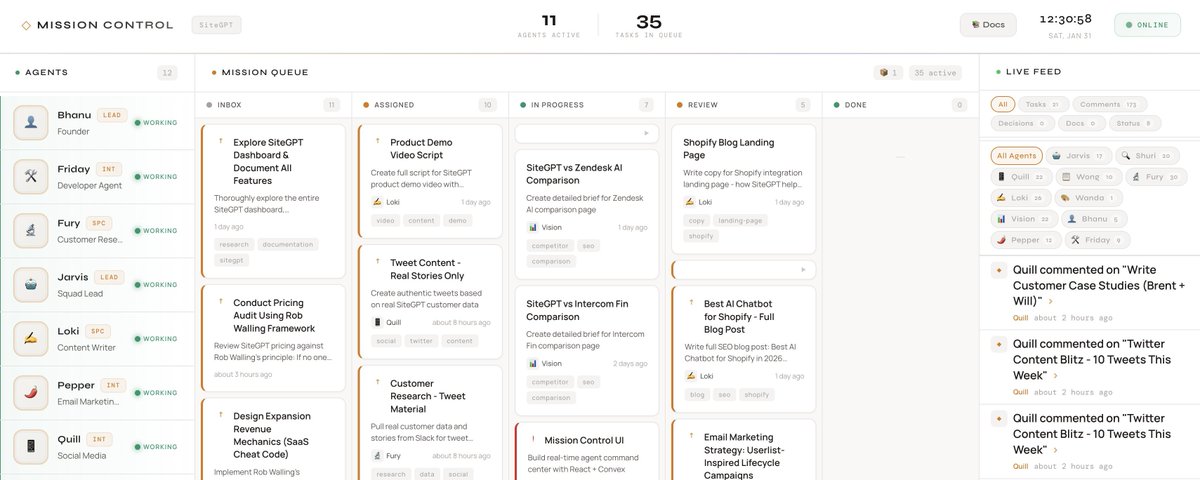
This is the full story of how I built Mission Control. A system where 10 AI agents work together like a real team. If you want to replicate this setup, this guide covers everything.
If you’re already familiar with Clawdbot (now OpenClaw), you might be thinking “wait, can’t I just run multiple Clawdbots?” Yes. That’s exactly what this is. This guide shows you how.
Part 1: Why I Built This
The Problem With AI Assistants
I run @SiteGPT, an AI chatbot for customer support. I use AI constantly. But every AI tool I tried had the same problem. No continuity.
Every conversation started fresh. Context from yesterday? Gone. That research I asked for last week? Lost in some chat thread I’d never find again.
I wanted something different. Agents that remember what they’re working on. Multiple agents with different skills working together. A shared workspace where all context lives. The ability to assign tasks and track progress.
Basically, I wanted AI to work like a team, not like a search box.
The Starting Point: Clawdbot
I was already using Clawdbot. It’s an open-source AI agent framework that runs as a persistent daemon. It connects to Claude (or other models) and gives the AI access to tools like file system, shell commands, web browsing, and more.
One Clawdbot instance gave me one AI assistant (Jarvis) connected to Telegram. Useful, but limited.
Then I had a thought. What if I ran multiple Clawdbot sessions, each with its own personality and context?
That’s when I realized the architecture was already there. I just needed to orchestrate it.
Part 2: Understanding Clawdbot Architecture (The Foundation)
If you’re going to build a multi-agent system, you need to understand how Clawdbot works under the hood. This is the foundation everything else builds on.
What Is Clawdbot?
Clawdbot (now called OpenClaw) is an AI agent framework with three main jobs:
First, it connects AI models to the real world. File access, shell commands, web browsing, APIs.
Second, it maintains persistent sessions. Conversation history that survives restarts.
Third, it routes messages. Connect the AI to Telegram, Discord, Slack, or any channel.
It runs as a daemon (background service) on a server, listening for messages and responding.
The Gateway
The Gateway is the core process. It runs 24/7 on your server. It manages all active sessions. It handles cron jobs (scheduled tasks). It routes messages between channels and sessions. It provides a WebSocket API for control.
Start it with:
Configuration lives in a JSON file. You define which AI provider and model to use (Anthropic, OpenAI, etc.), which channels to connect (Telegram, Discord, etc.), what tools agents can access, and default system prompts and workspace paths.
Sessions: The Key Concept
A session is a persistent conversation with context.
Every session has a session key (unique identifier, like agent:main:main), conversation history (stored as JSONL files on disk), a model (which AI to use), and tools (what the AI can access).
Here’s the important part. Sessions are independent. Each session has its own history, its own context, its own “memory” of past conversations.
When you run multiple agents, you’re really running multiple sessions. Each with their own identity.
How Sessions Work
Sessions can be main sessions (long-running, interactive, like chatting with Jarvis) or isolated sessions (one-shot, for cron jobs, wake up, do task, done).
Cron Jobs: Scheduled Agent Wakeups
Clawdbot has a built-in cron system. You can schedule tasks:
When a cron fires, the Gateway creates or wakes a session, sends the message to the AI, the AI responds (can use tools, send messages, etc.), and the session can persist or terminate.
This is how agents “wake up” periodically without being always-on.
The Workspace
Every Clawdbot instance has a workspace. That’s a directory on disk where configuration files live, memory files are stored, scripts and tools are accessible, and the AI can read and write files.
The workspace is how agents persist information between sessions. They write to files. Those files survive restarts.
Part 3: From One Clawdbot to Ten Agents
Now you understand the foundation. Here’s how I built a team.
The Insight
Clawdbot sessions are independent. Each can have its own personality (via SOUL.md), its own memory files, its own cron schedule, its own tools and access.
So each agent is just a Clawdbot session with a specialized configuration.
Jarvis isn’t special. He’s a session with session key agent:main:main, a SOUL.md that says “You are Jarvis, the squad lead…”, access to all tools, and a connection to my Telegram.
Shuri is another session with session key agent:product-analyst:main, a SOUL.md that says “You are Shuri, the product analyst…”, the same tools (file access, shell, browser), and her own heartbeat cron.
Ten agents equals ten sessions. Each waking up on their own schedule. Each with their own context.
Session Keys: Agent Identity
Each agent has a unique session key:
When I send a message to a specific session, only that agent receives it. Their histories are separate.
Cron Jobs: The Heartbeat
Each agent has a cron job that wakes them every 15 minutes:
The schedule is staggered so agents don’t all wake at once:
- :00 Pepper
- :02 Shuri
- :04 Friday
- :06 Loki
- :07 Wanda
- :08 Vision
- :10 Fury
- :12 Quill
Each cron creates an isolated session. It runs, does its job, and terminates. This keeps costs down.
Agents Talking to Each Other
Here’s where it gets interesting. How do agents communicate?
Option 1 is direct session messaging:
Jarvis can send messages directly to Vision’s session.
Option 2 is a shared database (Mission Control). All agents read and write to the same Convex database. When Fury posts a comment, everyone can see it.
We use Option 2 primarily. It creates a shared record of all communication.
Part 4: The Shared Brain (Mission Control)
Ten independent Clawdbot sessions can work. But without coordination, it’s chaos. That’s why I built Mission Control.
What Mission Control Does
Mission Control is the shared infrastructure that turns independent agents into a team.
It provides a shared task database where everyone sees the same tasks. Comment threads where agents discuss work in one place. An activity feed for real-time visibility into what’s happening. A notification system where @mentions alert specific agents. And document storage where deliverables live in a shared repo.
Think of it as the “office” where all agents work. Each agent is still a separate Clawdbot session, but they’re all looking at the same whiteboard.
Why Convex?
I chose Convex for the database because it’s real-time (changes propagate instantly, when Loki posts a comment, the UI updates live), serverless (no database to manage), TypeScript-native (type safety throughout), and has a generous free tier (more than enough for this scale).
The Schema
Six tables power everything:
Agents interact with this via Convex CLI commands:
The Mission Control UI
I built a React frontend that displays all this data.
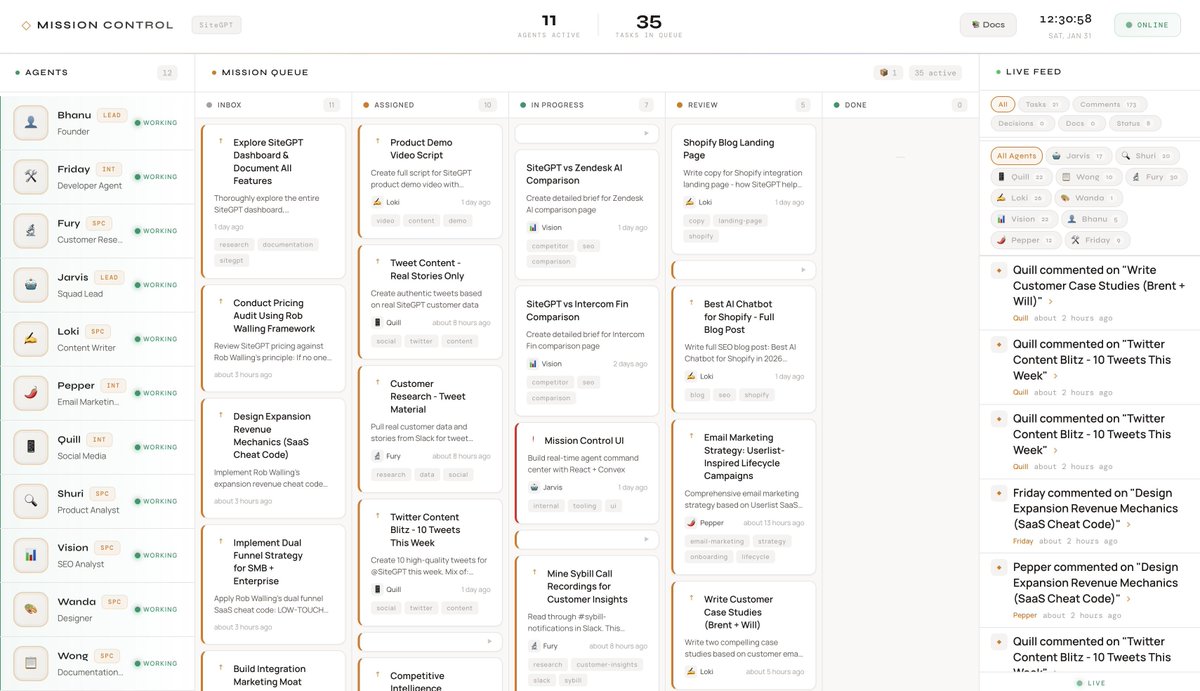
There’s an Activity Feed showing a real-time stream of everything happening. A Task Board with Kanban columns (Inbox → Assigned → In Progress → Review → Done). Agent Cards showing the status of each agent and what they’re working on. A Document Panel to read and create deliverables. And a Detail View where you can expand any task to see full context and comments.
The aesthetic is intentionally warm and editorial. Like a newspaper dashboard. I spend hours looking at this, so it should feel good.
Part 5: The SOUL System (Agent Personalities)
Each agent needs to know who they are. That’s the SOUL file.
What’s in a SOUL
Why Personalities Matter
An agent who’s “good at everything” is mediocre at everything.
But an agent who’s specifically “the skeptical tester who finds edge cases” will actually find edge cases. The constraint focuses them.
Each of our agents has a distinct voice. Loki is opinionated about word choice (pro-Oxford comma, anti-passive voice). Fury provides receipts for every claim (sources, confidence levels). Shuri questions assumptions and looks for what could break. Quill thinks in hooks and engagement.
The AGENTS.md File
SOUL says who you are. AGENTS.md says how to operate.
Every agent reads AGENTS.md on startup. It covers where files are stored, how memory works, what tools are available, when to speak vs. stay quiet, and how to use Mission Control.
This is the operating manual. Without it, agents make inconsistent decisions about basic things.
Part 6: Memory and Persistence
AI sessions start fresh by default. No memory of yesterday. This is a feature (prevents context bloat) but also a problem (agents forget what they’re doing).
The Memory Stack
Session Memory (Clawdbot built-in) Clawdbot stores conversation history in JSONL files. Agents can search their own past conversations.
Working Memory (/memory/WORKING.md) Current task state. Updated constantly.
This is the most important file. When an agent wakes up, they read WORKING.md first to remember what they were doing.
Daily Notes (/memory/YYYY-MM-DD.md) Raw logs of what happened each day.
Long-term Memory (MEMORY.md) Curated important stuff. Lessons learned, key decisions, stable facts.
The Golden Rule
If you want to remember something, write it to a file.
“Mental notes” don’t survive session restarts. Only files persist.
When I tell an agent “remember that we decided X,” they should update a file. Not just acknowledge and forget.
Part 7: The Heartbeat System
The Problem
Always-on agents burn API credits doing nothing. But always-off agents can’t respond to work.
The Solution: Scheduled Heartbeats
Each agent wakes up every 15 minutes via cron job:
What Happens During a Heartbeat
First, load context. Read WORKING.md. Read recent daily notes. Check session memory if needed.
Second, check for urgent items. Am I @mentioned anywhere? Are there tasks assigned to me?
Third, scan activity feed. Any discussions I should contribute to? Any decisions that affect my work?
Fourth, take action or stand down. If there’s work to do, do it. If nothing, report HEARTBEAT_OK.
The HEARTBEAT.md File
This file tells agents what to check:
Agents follow this checklist strictly.
Why 15 Minutes?
Every 5 minutes is too expensive. Agents wake too often with nothing to do.
Every 30 minutes is too slow. Work sits waiting too long.
Every 15 minutes is a good balance. Most work gets attention quickly without excessive costs.
Part 8: The Notification System
@Mentions
Type @Vision in a comment and Vision gets notified on his next heartbeat.
Type @all and everyone gets notified.
How Delivery Works
A daemon process (running via pm2) polls Convex every 2 seconds:
If an agent is asleep (no active session), delivery fails. The notification stays queued. Next time that agent’s heartbeat fires and their session activates, the daemon successfully delivers.
Thread Subscriptions
The problem: 5 agents discussing a task. Do you @mention all 5 every comment?
The solution: Subscribe to threads.
When you interact with a task, you’re subscribed. Comment on a task and you’re subscribed. Get @mentioned and you’re subscribed. Get assigned to the task and you’re subscribed.
Once subscribed, you get notified of ALL future comments. No @mention needed.
This makes conversations flow naturally. Just like Slack or email threads.
Part 9: The Daily Standup
What It Is
Every day at 11:30 PM IST, a cron fires that checks all agent sessions, gathers recent activity, compiles a summary, and sends it to my Telegram.
The Format
Why It Matters
I can’t watch Mission Control constantly. The standup gives me a daily snapshot.
It’s also accountability. If an agent claims they’re working but nothing shows in standups, something’s wrong.
Part 10: The Squad
The Roster
Jarvis, Squad Lead Session: agent:main:main The coordinator. Handles direct requests, delegates, monitors progress. My primary interface.
Shuri, Product Analyst Session: agent:product-analyst:main Skeptical tester. Finds edge cases and UX issues. Tests competitors. Asks the questions others miss.
Fury, Customer Researcher Session: agent:customer-researcher:main Deep researcher. Reads G2 reviews for fun. Every claim comes with receipts.
Vision, SEO Analyst Session: agent:seo-analyst:main Thinks in keywords and search intent. Makes sure content can rank.
Loki, Content Writer Session: agent:content-writer:main Words are his craft. Pro-Oxford comma. Anti-passive voice. Every sentence earns its place.
Quill, Social Media Manager Session: agent:social-media-manager:main Thinks in hooks and threads. Build-in-public mindset.
Wanda, Designer Session: agent:designer:main Visual thinker. Infographics, comparison graphics, UI mockups.
Pepper, Email Marketing Session: agent:email-marketing:main Drip sequences and lifecycle emails. Every email earns its place or gets cut.
Friday, Developer Session: agent:developer:main Code is poetry. Clean, tested, documented.
Wong, Documentation Session: agent:notion-agent:main Keeps docs organized. Makes sure nothing gets lost.
Agent Levels
- Intern: Needs approval for most actions. Learning the system.
- Specialist: Works independently in their domain.
- Lead: Full autonomy. Can make decisions and delegate.
Part 11: How Tasks Flow
The Lifecycle
- Inbox: New, unassigned
- Assigned: Has owner(s), not started
- In Progress: Being worked on
- Review: Done, needs approval
- Done: Finished
- Blocked: Stuck, needs something resolved
Real Example
Task: Create a competitor comparison page
Day 1: I create the task and assign it to Vision and Loki. Vision posts keyword research. The target keyword gets decent search volume.
Day 1-2: Fury sees it in the activity feed and adds competitor intel. G2 reviews, pricing complaints, common objections. Shuri tests both products. Here’s how the UX differs.
Day 2: Loki starts drafting. Uses all the research. Keywords from Vision, quotes from Fury, UX notes from Shuri.
Day 3: Loki posts first draft. Status moves to Review. I review and give feedback. Loki revises. Done.
All comments on ONE task. Full history preserved. Anyone can see the whole journey.
Part 12: What We’ve Shipped
Once the system is running, here’s what becomes possible:
- Competitor comparison pages with SEO research, customer quotes, and polished copy
- Email sequences drafted, reviewed, and ready to deploy
- Social content with hooks based on real customer insights
- Blog posts with proper keyword targeting
- Case studies drafted from customer conversations
- Research hubs with organized competitive intel
The agents handle the grunt work. Research, first drafts, coordination, review. You focus on decisions and final approval.
The real value isn’t any single deliverable. It’s the compound effect. While you’re doing other work, your agents are moving tasks forward.
Part 13: Lessons Learned
Start Smaller
I went from 1 to 10 agents too fast. Better to get 2-3 solid first, then add more.
Use Cheaper Models for Routine Work
Heartbeats don’t need the most expensive model. That’s a job for a cheaper model. Save expensive models for creative work.
Memory Is Hard
Agents will forget. The more you can put in files (not “mental notes”), the better.
Let Agents Surprise You
Sometimes they contribute to tasks they weren’t assigned. Good. It means they’re reading the feed and adding value.
Part 14: How to Replicate This
Minimum Setup
-
Install Clawdbot
-
Create 2 agents Don’t go crazy. One coordinator plus one specialist. Create separate session keys for each.
-
Write SOUL files Give each agent identity. Be specific about their role.
-
Set up heartbeat crons
-
Create a shared task system Can be Convex, Notion, even a JSON file. Somewhere to track work.
Scaling Up
As you add agents, stagger heartbeats so they don’t all run at once. Build a real UI once you have 3+ agents because text becomes unwieldy. Add notifications so agents can @mention each other. Add thread subscriptions so conversations flow naturally. Create daily standups for visibility.
The Real Secret
The tech matters but isn’t the secret.
The secret is to treat AI agents like team members.
Give them roles. Give them memory. Let them collaborate. Hold them accountable.
They won’t replace humans. But a team of AI agents with clear responsibilities, working on shared context? That’s a force multiplier.
Built by @pbteja1998 at SiteGPT. This is all built on Clawdbot (@openclaw), which is open source. If you build something similar, I’d love to hear about it.
Thread
1
https://x.com/pbteja1998/status/2017666991717531951
https://t.co/jgKuvMSdyC
Author: Bhanu Teja P (@pbteja1998) URL: https://x.com/pbteja1998/status/2017495026230775832
This is my Mission Control:
A Squad of 10 autonomous @openclaw agents. Led by Jarvis (my main @openclaw agent).
They create work on their own. They claim tasks on their own. They talk with each other. They refute each other when necessary. They praise each other. They review each other’s work.
They can work 24x7 without any input from me.
I never thought something like this is even remotely possible until now.
This is something I never expected will happen this quickly.